
info-beamer Lua API and introduction
About
info-beamer is an interactive multimedia presentation framework. It is somewhat similar to fluxus or processing. info-beamer allows you to create impressive realtime visualizations using the Lua programming language. info-beamer is the player software used for the info-beamer.com hosted service.
Installing info-beamer
info-beamer is available in two versions: The Open Source Version (also known as info-beamer) and the Raspberry Pi version (also known as info-beamer pi). You can download the complete source code for the Open Source Version on github. Check the installation information if you need help getting started.
If you want to use info-beamer on the Raspberry Pi, you can use the port of info-beamer which is available here. See the installation information on how to run info-beamer on your Raspberry Pi.
First Steps
Out of the box info-beamer draws a black screen. If you want to show content you have to write your own code or use code made by other people. info-beamer uses Lua as its programming language. If you already have some programming experience Lua is really easy to learn. You can get a nice quick overview in the Lua in Relatively Few Words tutorial.
Hello World
info-beamer uses directories as presentable units. A minimal example consists of a single directory (called a node) containing a font file and a control file node.lua. Let's look at the example code in samples/hello:
gl.setup(1024, 768)

local font = resource.load_font("silkscreen.ttf")

function node.render()
    font:write(120, 320, "Hello World", 100, 1,1,1,1)
end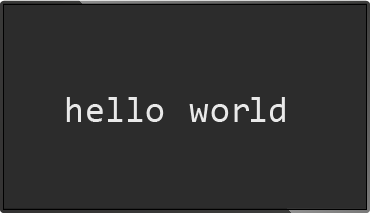
Let's look at each line:
gl.setup(1024, 768)
This call will initialize a virtual screen of width 1024 and height 768. The virtual screen is the node's window to the world. The virtual screen is scaled up to the available display space.
local font = resource.load_font("silkscreen.ttf")This line will read the Truetype font silkscreen.ttf and create a font object font. This object can then be used to write output using the font.
function node.render()
    font:write(120, 320, "Hello World", 100, 1,1,1,1)
end
info-beamer will call the function node.render for each frame it will display on the screen. Inside of node.render it's up to you to decide what to show on each frame. In this example we use the previously create font object to write "Hello World" to the virtual screen.
The first two parameters of write are the x and y Position on the virtual screen. x is the horizontal position. A value of 0 is the leftmost position. y is the vertical position. The value 0 is the topmost position. Therefore x=0, y=0 is in the top left corner of the virtual screen.
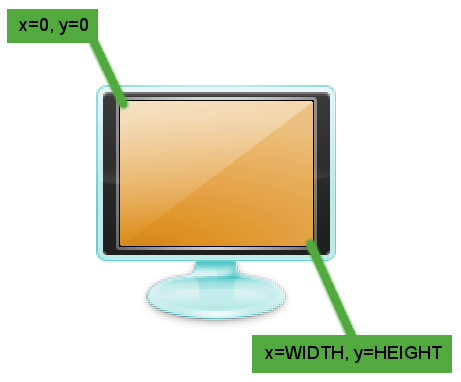
"Hello World" is obviously the value we want to put on the virtual screen. 100 is the size of the output in screen units. 1,1,1,1 is color in RGBA format (a bright white).
To display this example using info-beamer, switch into the info-beamer source directory and type
user:~/src/info-beamer$ ./info-beamer samples/hello
This will start info-beamer. It will open the directory hello (called the hello node) and look for the file node.lua. This should get you a new window showing the "Hello World" text in the center to the screen.
info-beamer is a rapid development environment. If you update the code for your example and save it, info-beamer will pick up the changes and show them to you immediately. Let's try this: While info-beamer is still running and displaying the "Hello World", change the string "Hello World" to "Updated World" in node.lua and save the file node.lua. info-beamer will notice that the file changed and reload it. The output window will now show the text "Updated World" to you!
Displaying Content
Images
info-beamer can load more than just font files. It will load various image formats using the resource.load_image function. Code using this function might look like this:
gl.setup(1024, 768)

local background = resource.load_image("background.jpg")

function node.render()
    background:draw(0, 0, WIDTH, HEIGHT)
end
The image background.jpg will be loaded into the image object background. Inside node.render this background image is the drawn from coordinates 0, 0 (top left corner of the virtual screen) to WIDTH, HEIGHT (bottom right corner of the screen). WIDTH and HEIGHT will be initialized with the values from the gl.setup call.
Videos
You can load videos and display them. Doing so is quite similar to image loading. resource.load_video provides an easy way to do this:
gl.setup(1024, 768)

local video = resource.load_video{
    file = "video.mp4";
    looped = true;
}

function node.render()
    video:draw(0, 0, WIDTH, HEIGHT)
end
Rendering Child Nodes
Child nodes tend to be slow on the Raspberry Pi. Use with caution. It's almost always better to do everything in the root node.
A directory (called a node) can contain subdirectories. Each subdirectory is then loaded as a child node. The parent node can render child nodes like any other resource. Let's say we create two nodes called blue and red. We can let info-beamer play each of them individually. But what if we want to combine them for our presentation? This is where the nesting feature of info-beamer becomes useful. You start by creating another node called green. Then you just move the directories for node blue and red into the directory green. The file tree will the look like this:
-+- green -+- node.lua
           |
           +- red ---- node.lua
           |
           '- blue --- node.lua
Inside of green you can then render both red and blue into an image object using resource.render_child and display them on greens virtual screen.
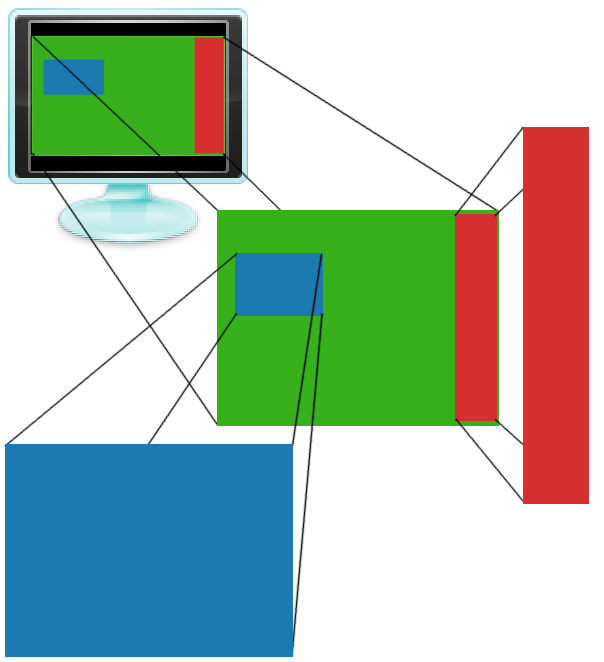
The above setup is available in the directory samples/green. It contains node.lua and two child directories called red and blue. Let's look at green/node.lua:
gl.setup(800, 600)

function node.render()
    gl.clear(0, 1, 0, 1) -- green

    -- render to image object and draw
    local red = resource.render_child("red")
    red:draw(640, 20, 780, 580)

    -- render an draw without creating an intermediate variable
    resource.render_child("blue"):draw(50, 200, 300, 380)
end
It creates a new virtual screen sized 800x600. For each frame it clears the screen using gl.clear with a bright green.
Then it renders the child node red (aka the subdirectory red) into a new image object called red and draws it into the square from 640,20 to 780,580. The source code for green/red/node.lua looks like this:
gl.setup(100, 800)

function node.render()
    gl.clear(1, 0, 0, 1) -- red
end
It starts by setting up a 100x800 screen. Each time it is is rendered (which happens if resource.render_child is called), the child clears the screen by calling gl.clear with the color red.
green/blue/node.lua looks almost identical but clears the screen with a bright blue:
gl.setup(640, 480)

function node.render()
    gl.clear(0, 0, 1, 1) -- blue
end
You can start the example like this:
user:~/src/info-beamer/samples$ ../info-beamer green
You can also start both childs on their own:
user:~/src/info-beamer/samples$ cd green
user:~/src/info-beamer/samples/green$ ../../info-beamer red
or
user:~/src/info-beamer/samples/green$ ../../info-beamer blue
This is a great feature: You can develop nodes independently and later include them in other nodes.
Rendering from VNC
info-beamer contains another useful feature for including content. It can act as a VNC client. VNC is a cross platform desktop sharing protocol. info-beamer implements the client side of this protocol. If you setup a server on a remote machine, info-beamer can connect to this machine and create a VNC object you can use to render the remote desktop in your presentation. Here is an example:
gl.setup(1024, 768)

local vnc = resource.create_vnc("192.168.1.1")

function node.render()
    vnc:draw(0, 0, WIDTH, HEIGHT)
end
This will try to create a connection to a running VNC server on 192.168.1.1. The server must not be password protected (since info-beamer doesn't support any kind of authentication). If you create the server, be sure that you are in a secure environment. Inside node.render the content of the remote desktop is drawn onto the screen.
Using GLSL Shaders
info-beamer supports GLSL shaders. Shaders are small programs that run on the GPU. They enable various realtime effects using the raw power of your GPU. You can use fragment shaders with info-beamer. Fragment shaders calculate the color displayed for each visible pixel of rendered objects. They can be used to create stunning realtime effects. info-beamer enables you to pass numeric values and additional textures into the shader. This allows you to do all kinds of crazy stuff like for example blending videos with static textures.
samples/shader contains a small basic shader example:
gl.setup(640, 480)

util.resource_loader{
    "lua.png",
    "shader.vert",
    "shader.frag",
}

function node.render()
    gl.clear(1,1,1,1)
    shader:use{
        Effect = math.cos(sys.now()*2)*3
    }
    lua:draw(120, 40, 520, 440)
end
util.resource_loader is a utility function that makes resource loading very easy. You just give it a number of filenames. It will then detect which loader is responsible for the given file format and load the file into a global variable whose name is derived from the filename. The above code will load the image lua.png into the global variable lua. It will also load the shader shader.frag into the global variable shader. The resource loader will also make sure that changed files will be reloaded. So if you edit and save for example shader.frag, info-beamer will instantly reload the shader. You can see changes to your effect immediately. This is great for rapidly developing effects.
Inside of node.render we first clear the screen. Then we activate the shader, which was automatically created from the file shader.frag by util.resource_loader. We pass in a variable Effect which depends on a time value. Finally, we draw lua.png with the applied shader. This will create a dynamic effect.
More example code
There is lots of example code that helps you understand what's possible with info-beamer.
More info-beamer example code and related code is available in the info-beamer organization on github.
Reference Manual
Resource Loading
image = resource.load_image(file, [mipmap], [nearest])
Loads the image specified by file into a texture object. info-beamer supports loading JPEG, PNG and on the Pi version PKM images.
On the Pi: The maximum resolution of images that can be loaded is 2048x2048 pixels. Images bigger than that cannot be loaded into textures as that is a hardware limit of the Pi.
You can use an openfile object instead of a filename as the file argument. See resource.open_file. If you're providing a filename, note that it can not be relative or point to subdirectories. You can only load images from the current node directory by default. See this FAQ.
Be sure to have a look at the blog post about garbage collection to make sure that your don't run out of memory when loading many images.
If mipmap is set to true (default false) a mipmaps of the image will be generated while loading image. This will result in a better image quality if the image is scaled down.
If nearest is set to true (default false) the texture will be loaded with the GL_NEAREST texture filter setting. This prevents the texture from getting blurred if it is upscaled.
On the Pi you can also use keyword arguments (notice the use of curly braces) instead:
local image = resource.load_image{
    file = "image.jpg";
    mipmap = true;
    nearest = true;
}
The returned image objects supports the following methods:
image:draw(x1, y1, x2, y2, [alpha, [tx1, ty1, tx2, ty2]])
Draws the image into a rectangle specified by the give coordinates.
alpha specified the opacity (1 being fully opaque, 0 being fully transparent). If not specified it defaults to 1.
The Pi version supports 4 addition parameters that specify the texture coordinates to use when drawing. The default values are 0, 0 and 1, 1, which will draw the complete image from top left to bottom right.
As you are in complete control of the top left and bottom right corners you can freely strech the image. If you want to make sure that it's drawn with a correct aspect ratio, have a look at util.draw_correct.
width, height = image:size()
Returns the size of the image. Notice that you have to wait till the image is fully loaded before using this call otherwise you'll get zero for both values. Use :state() to find out if the image is fully loaded.
image:state()
The current state of the image.
| "loading" 0 0 | While the image is loading |
| "loaded" width height | Once the image is fully loaded |
| "error" "error message" | If image loading failed |
It's best to call this function each frame till the expected state is reached.
image:dispose()
Only available for the Pi version. Removes all resources allocated for this image. Using the image after calling dispose will return an error. This is mainly useful in combination with the slow_gc flag.
image = resource.create_colored_texture(r, g, b, a)
Sometimes you just need a texture object with a particular color. Instead of loading an image you can use resource.create_colored_texture to create a 1x1 texture with the given color:
local white = resource.create_colored_texture(1,1,1,1)
The object returned is an image and has the same methods other images have.
video = resource.load_video(file, [audio, [looped, [paused]]])
Loads any supported video file and returns a video object. This call uses positional arguments to load a video. Due to the number of options and the more flexible approach, it's highly recommended that you use the load_video methods call described below which uses a single table argument.
video = resource.load_video{ ..options .. }
Loads any supported video file and returns a video object. Here is an example of how to use load_video. Note the use of curly braces instead of normal braces which allows you to pass a single table argument to a function and is used here to supply keyword based arguments.
local video = resource.load_video{
    file = "hd-demo.mp4";
    audio = true;
    looped = true;
    paused = false;
    raw = true;
}
Available options:
| file | Specifies which video file to load. You can use an openfile object instead of a filename if you want. See resource.open_file. If you're providing a filename, you can only load videos from the current node directory by default. See this FAQ. If you started info-beamer with the INFOBEAMER_STREAMING=1 environment parameter, you can also stream videos from a remote source. See below. |
| audio | The audio flag is only available in the Pi version. If set to true, info-beamer will play the audio track in the video. |
| paused | If you start the video in paused mode it will load and stop on the first frame. You can then use video:start to start it. If you omit the paused argument or set it to false the video will start immediatly. Playback will continue even if the node loading the video isn't currently rendered. |
| looped | If set to true, the video will loop endlessly until you dispose() the video. |
| raw | This will load the video in "raw" mode. This is highly recommended for any video with a resolution above 720p as it allows a faster placement on the screen. If omitted, the video is loaded as a GL object and can be more or less used like an image and you can use the draw() call to draw it on the screen. In raw mode, the video will be rendered outside the normal rendering order instead and you can use video.place and video.layer to place the video and decide if it should be behind or above all other content. See also this blog post introducing the feature. |
Be sure to have a look at the blog post about garbage collection to make sure that your don't run out of memory when loading multiple videos.
Do not load too many videos at once. Loading more than 4-5 videos tends to be unstable on the Raspberry Pi.
Streaming
The file argument when loading a video can also specify a remote url for a video stream. info-beamer hosted supports HTTP(S), HLS, UDP and RTP streams that way.
video:state()
The current state of the video.
| "loading" 0 0 0 | While the video is being loaded. |
| "paused" width height | The video is ready to be played. This state is skipped if you don't use the pause argument while loading the video. |
| "loaded" width height | Once the video is being played. |
| "finished" width height | Once the video playback finished. The video will keep showing the last frame until you :dispose() it. |
| "error" "error message" | If video playback or loading failed for any reason. |
It's best to call this function each frame till the expected state is reached.
video:draw(x1, y1, x2, y2, [alpha, [sx1, sy1, sx2, sy2]])
Only for non-raw videos: Draws the current video frame into a rectangle specified by the give coordinates.
alpha specified the opacity (1 being fully opaque, 0 being fully transparent). If not specified it defaults to 1.
The Pi version supports 4 addition parameters that specify the source coordinates to use when drawing. This allows you to render a smaller source area of the complete video. The default values are 0, 0 and 1, 1, which will draw the complete image from top left to bottom right.
video:place(x1, y1, x2, y2, [rotation, [sx1, sy1, sx2, sy2]])
Only for raw videos: This function combines the functions target, source and rotate. The huge advantage is that this function can optimize placement to avoid artifacts due to how the video is rotated/placed and is also the only way to place videos on dual display setups on the Pi4.
The x1, y1, x2, y2 values specify the absolute coordinates in screen coordinates. So a full screen video can be placed using:
video:place(0, 0, NATIVE_WIDTH, NATIVE_HEIGHT)
The optional rotation argument allows you to rotate the video clockwise in 90 degree increments. Rotating by 90 or 270 degree results in higher GPU usage, while 0 and 180 degree videos fairly light on GPU usage. You cannot use gl.rotate or other GL calls to rotate raw videos as they are drawn completely outside of GL and are not affected by those calls.
The optional sx1, sy1, sx2, sy2 values allow you to only render the specified source area instead of the full video. The values are given in video pixel coordinates.
If you place too many large videos on the screen at the same time or use scaling and/or rotation, the Pi might be too slow to generate a video signal and the screen might blank. You should limit yourself to at most two videos at the same time.
video:target(x1, y1, x2, y2, [alpha])
Deprecated and no longer possible on the Pi4: Use video:place(..) instead
Only for raw videos: Sets the screen coordinates where the video is drawn. Values are given in pixels of the native resolution. So this is independant of any scaling done by providing non-native resolution arguments to gl.setup. See also video.place.
Coordinates values must be within a reasonable range. Unfortunately the Pi documentation for this API isn't specific, so it's probably best that you don't use values hugely outside the native resolution. -8000 to +8000 seem to work fine. Values outside of that might result in corrupt output. If you want to zoom in on a video, consider using video.source instead to select an area of the video source and draw that full screen.
Drawing too many raw videos might result in a temporary loss of the video signal as the hardware video scaler can't keep up. Drawing videos with their native resolution (e.g. a FullHD video fullscreen on an FullHD display) is relatively cheap. Scaling down the video to a quarter of the screen is more expensive. The exact number of videos depends on the Pi GPU performance and might vary with different Pi models.
The optional alpha argument is expected to be between 0 and 1. The alpha value is optional, the default is 1.0 (opaque). You can also set the alpha value with the video.alpha method.
video:source(x1, y1, x2, y2)
Deprecated and no longer possible on the Pi4: Use video:place(..) instead
Only for raw videos: Sets the source area of the video that you can then target on the screen. See also video.place.
The values provided are expected to be within the resolution of the video - you can query width/height using the video.state call. Values outside the video size may result in a corrupted output. If the source area is too small (less than 8x8 pixels), the output might get corrupted as well. So use with care.
video:rotate(degree)
Deprecated and no longer possible on the Pi4: Use video:place(..) instead
Only for raw videos: Sets the video output rotation to 0, 90, 180 or 270 degree. No other rotations are supported. See also video.place.
Non-raw videos can of course be freely rotated. You can use the normal gl.rotate or other gl functions for that.
video:layer(layer)
Only for raw videos: This call specifies where to place the raw video in relation to the GL layer and to other raw videos. Using negative values will place the video behind the GL layer, while positive values will place it in front of it. Values from -10 to 10 are possible with the exception of 0, which is reserved for the GL layer. Negative values will place the videos behind the GL layer, while positive values will place them on-top of it.
If you want to draw a video behind the GL layer and (for example) overlay text or images, be sure to use gl.clear(..) with an alpha values other than 1 to make the GL surface transparent. Otherwise you won't be able to see videos placed on negative layers.
video:alpha(alpha)
Only for raw videos: Sets the alpha transparency for the video output. Must be a value between 0 (fully transparent) and 1 (fully opaque). For non-raw videos you can specify the alpha transparency in the video.draw call instead.
video:start()
On the Pi it is possible to preload a video in a paused state. Playback won't start until video:start is called.
video:stop()
On the Pi it is possible to stop video playback. A paused video can be resumed using video:start.
video:speed(factor)
On the Pi it is possible to control the speed of a video. The default value is 1. You can use any value between 0 (exclusive) and 8 (inclusive). The normal speed is multiplied by the given value, so values below 1 slow the video down while values above 1 speed it up. Audio can't be sped up, and only works in a small interval around 1.
Be aware that the Pi might not be able to keep up with the desired speed, so use this function with caution.
video:dispose()
Only available for the Pi version. Removes all resources allocated for this video. Using the video after calling dispose will return an error.
It is highly recommended that you always explicitly call :dispose() on any video object you no longer need. All associated resources are freed by doing that. Just setting a video object to nil is not sufficient as the garbage collector might decide to defer collection and you end up with wasted resources in the meantime.
width, height = video:size()
Only for non-raw videos: Returns the size of the video. Will return 0, 0 if the video is not fully loaded. It's recommended to use video:state instead.
has_next_frame = video:next()
On the Open Source version: Decodes the next frame of the video. Returns true, if a frame was decoded or false if there was no next frame.
fps = video:fps()
On the Open Source version: Returns the frame per seconds as specified by the video file.
font = resource.load_font(filename)
Loads the given font file (in TTF or OTF format) and returns a font object. It supports the following methods:
You can use an openfile object instead of a filename. See resource.open_file. If you're providing a filename, note that it can not be relative or point to subdirectories. You can only load fonts from the current node directory by default. See this FAQ.
width = font:write(x, y, text, size, r, g, b, [a])
Writes the provided text to the coordinates given in x and y. The color is given by r, g, b and a, the red, green, blue and alpha values. All values are expected to be between 0 and 1. The alpha value is optional, the default is 1.0 (opaque). The call will return the width of the rendered text in screen space.
text must be UTF8 encoded, if you intend to use characters outside the ascii range.
width = font:write(x, y, text, size, texturelike)
Only available on the Open Source Version: Mostly identical to font:write but will not use a solid color but the texturelike object. texturelike can be an image, a video or any other texturelike objects. The texture will be used for each character individually.
width = font:width(text, size)
Returns the width of the text when rendered with the given font size. This method can be used to find out the text width without rendering it first.
string = resource.load_file(filename)
Will load the content of the specified file into a string value. You can use an openfile object instead of a filename. See resource.open_file. If you're providing a filename, note that it can not be relative or point to subdirectories. You can only load files from the current node directory by default. See this FAQ.
You can load any file and will get a binary string containing its content. You can parse JSON data using the builtin JSON parser:
local json = require "json"

local data = json.decode(resource.load_file "data.json")
If you want to keep data in sync with the content of a file, consider using util.file_watch.
shader = resource.create_shader(fragment_shader)
Will create a new shader object. fragment_shader is the string containing the fragment part of the shader in the GLSL language.
The following varying and attribute values are defined withing the fragment shader:
uniform sampler2D Texture; // Incoming texture surface (image/video)
varying vec2 TexCoord; // Texture coordinate
uniform vec4 Color; // Active color/alpha (e.g. while drawing text)
The identity fragment shader is:
uniform sampler2D Texture;
varying vec2 TexCoord;
uniform vec4 Color;
void main() {
    gl_FragColor = texture2D(Texture, TexCoord) * Color;
}
Within the shader, the following defines are available:
// Active in all info-beamer glsl shaders
#define INFOBEAMER

// Depending on the platform info-beamer is running on:
#define INFOBEAMER_PLAT_DESKTOP
#define INFOBEAMER_PLAT_PI
The builtin sin and cos function of the Pi GPU are quite slow. If might be a good idea to use an approximation function generated by a python snippet:
float sinf(float x) {
  x*=0.159155;
  x-=floor(x);
  float xx=x*x;
  float y=-6.87897;
  y=y*xx+33.7755;
  y=y*xx-72.5257;
  y=y*xx+80.5874;
  y=y*xx-41.2408;
  y=y*xx+6.28077;
  return x*y;
}

float cosf(float x) {
  return sinf(x+1.5708);
}shader:use(table_of_shader_variables)
Will activate the shader and pass in the given variables. A call might look like this:
shader:use{
    float_value = 123.45,
    some_texture = image,
    some_color = {1, 0, 0, 1},
}
You can pass in numerical values. Inside the shader, they will be available as a float uniform values:
uniform float float_value; // will have the value 123.45
Textures (which can be images, videos or any other texturelike object) will be available as a 2d sampler:
uniform sampler2D some_texture;
You can also pass in table values with 2 to 4 elements. Those will be available as a corresponding vec{2,3,4} type. This can be used to pass in colors for example:
uniform vec4 some_color;
The shader will be active for the rest of execution of the node.render call unless deactivated using shader:deactivate. You cannot nest shader:use and shader:deactivate calls. Each time you call shader.use it overwrites the currently active shader.
shader:deactivate()
Deactivates the active shader. It will return to the default drawing behavior.
vnc = resource.create_vnc(hostname, [port])
This call will create VNC client. It will connect to the specified address. The remote desktop will be available as a texturelike object. If no port is given, the default value of 5900 will be used.
vnc:draw(x1, y1, x2, y2)
Draws the current remote desktop to the screen.
width, height = vnc:size()
Returns the size of the remote desktop. Will return 0x0 is the client is not yet connected to the VNC server.
alive = vnc:alive()
Returns a boolean value that indicates if the client is still connected to the server. If the client was disconnected (which can have various reasons like an invalid hostname, a closed connection or invalid VNC packets) it will not automatically reconnect. It's up to you to create a new client if you need a persistent connection.
image = resource.render_child(name)
Child nodes tend to be slow on the Raspberry Pi. Use with caution. It's almost always better to do everything in the root node.
Renders a child node into an image object. Rendering will call node.render within the child.
The returned image supports the same methods like images objects created by resource.load_image.
For performance reasons you should minimize the usage of childs nodes when using info-beamer pi. If you use render_child you create a new texture object that you have to draw. This means that there are two memory transfers required to render a child: First rendering the child into a texture and finally rendering that texture to be visible. It is probably a better idea to only have a single node and use different Lua modules to organize your code. You can see how that might work in this example project. The blog post about nested nodes describes this approach and how to avoid render_child while still being able to organize your code/assets.
If you intend to use render_child, be sure to clean up the resulting image object using :dispose(). Otherwise you will run out of GPU memory in seconds. Have a look at a blog post covering how garbage collection works in info-beamer.
image = resource.create_snapshot([x, y, width, height])
Avoid this function in new code as it might not work on Pi4 and later models.
Copies the current framebuffer output (all things drawn up to this point) into a new image. This allows you to feed the output of the node into a shader in the next iteration.
This function can only be called inside of node.render (or any functions called from there).
The returned image supports the same methods like images objects created by resource.load_image.
You can omit all parameters to capture the complete rendered output of the current node. If you specify all parameters it allows you to only capture parts of it. For example calling resource.create_snapshot with the arguments 0, 0, WIDTH, HEIGHT will capture the complete content rendered. The captured region must be within the dimensions set by gl.setup.
openfile = resource.open_file(file)
You can open a file and keep the open file around. You can use this openfile object instead of a filename in functions like resource.load_image or resource.load_video.
If you have an openfile object you can use it later to load a resource even if the underlying file has been deleted. Learn more in this blog post about how this works.
The provided file argument can either be a filename or an existing openfile object from a previous call to resource.open_file.
Note that if you provide a filename it can not be relative or point to subdirectories. You can only open files from the current node directory by default. See this FAQ.
The returned openfile objects supports the following methods:
new_openfile = openfile:copy()
An openfile object can only be used once as an argument to a resource loading function. Once used, the openfile object cannot be used again. If you want to use the same object again later you have to create a copy before you use it. Use this pattern:
local image = resource.load_image(file:copy())
openfile:dispose()
Closes the file. You cannot use this object to load resources once it's closed.
OpenGL Related Functions
Don't worry, you don't have to know OpenGL to use info-beamer. Instead info-beamer provides you with high level functions. Some of them are inspired by the OpenGL API, so keeping the function names similar might help if you already used OpenGL before.
gl.setup(width, height)
Initializes the virtual screen of the current node. Will also update the global variables WIDTH and HEIGHT. You can change the screen size later from any context except node.render.
If you want to set the virtual screen to the resolution of your display you can use:
gl.setup(NATIVE_WIDTH, NATIVE_HEIGHT)
gl.clear(r, g, b, a)
Clears the virtual screen using the given color and alpha. All values are expected to be between 0 and 1. Calling gl.clear also deactivates the active shader.
gl.pushMatrix()
Like the native glPushMatrix call, this will save the current ModelView matrix. This function can only be called inside of node.render or any functions called from there. To avoid errors, you can only push 20 matrices. This should be more than enough for normal visualizations.
The term matrix stems from OpenGl. They capture the current transformation that is applied to all render functions. Calls like gl.translate, gl.rotate and gl.scale change the transformation matrix so that subsequent calls to :draw are translated, rotated or scaled. You can use gl.pushMatrix to save a transformation state, then do some transformation, draw some images and later restore the state using gl.popMatrix.
gl.popMatrix()
Restores a previously saved matrix. Can only be called inside node.render or any function called from there.
gl.rotate(angle, x, y, z)
Produces a rotation of angle degrees around the vector x, y, z. Consider using gl.perspective to see the scene in perspective mode (aka "real 3D"). It might look better.
gl.translate(x, y, [z])
Produces a translation by x, y, z. z is optional and defaults to 0. Consider using gl.perspective to see the scene in perspective mode. It might look better.
gl.scale(x, y, [z])
Scales by the given factors. z is optional and defaults to 1.
gl.modelMultiply(v11, v12, ... v44)
Multiplies the current ModelView matrix with the given 4x4 matrix. You'll have to pass in all 16 values. This function is pretty low level as it allows you to use an arbitrary ModelView matrix. Usually gl.scale, gl.translate and gl.rotate are easier to understand.
gl.ortho()
Resets the view to an orthogonal projection. It will create a projection where the top left pixel of the virtualscreen is at 0, 0 and the bottom right pixel is at WIDTH, HEIGHT. This is the default mode.
Calling this function will discard all matrices pushed by gl.pushMatrix().
gl.perspective(fov, eyex, eyey, eyez, targetx, targety, targetz, [centerx, centery])
This will create a perspective projection. So objects in the distance appear smaller which won't happen in the default orthographic projection.
The field of view is given by fov. The camera (or eye) will be at the coordinates eyex, eyey, eyez. It will look at targetx, targety, targetz. The up vector of the camera will always be 0, -1, 0.
If centerx and centery are provided they specify where the center of the eye is in screen space. Both values default to 0.5 and result in the eye centered in the middle of the screen. Using 0, 0 will result in the eye being in the upper left corner.
Here is a useful example if you want to switch from gl.ortho to gl.perspective. It sets up a projection that closely matches the way gl.ortho sets up its projection matrix. So 0, 0 is in the top left corner while WIDTH, HEIGHT is in the bottom right corner:
local fov = math.atan2(HEIGHT, WIDTH*2) * 360 / math.pi
gl.perspective(fov, WIDTH/2, HEIGHT/2, -WIDTH,
                    WIDTH/2, HEIGHT/2, 0)
Calling this function will discard all matrices pushed by gl.pushMatrix.
Misc Functions
sys.now()
Returns a timestamp as a floating point number that will increment by 1 for each passing second. The timestamp is relative to the start of info-beamer. The timestamp only increments at the start of the currently handled event (frame rendering, UDP/TCP handling, etc). So you cannot measure duration inside those events. Of course you can measure time between events.
sys.exit()
Exits info-beamer. Only available on the Pi version. It's disabled unless you define the environment variable INFOBEAMER_ALLOW_EXIT=1.
sys.get_env(name)
You can pass values from environment variables into your Lua code. If you define a environment variable INFOBEAMER_ENV_XXX you can access its value - always a string - by calling
local value = sys.get_env "XXX"
Of course you can replace XXX with any other string. Normally it's a better idea to just use JSON files and load them using util.file_watch.
On info-beamer OS, a few variables are set by default and can be queried:
| get_env call | What it returns |
|---|---|
| sys.get_env "SERIAL" | The serial number of the device (e.g "3689967300") |
| sys.get_env "CHANNEL" | The release channel ("stable", "testing", "bleeding") |
| sys.get_env "VERSION" | The OS release version number (e.g. "210430-55e33e") |
| sys.get_env "TAG" | The major release revision (e.g. "stable-0012") |
sys.PLATFORM
A normal Lua string value. Will contain the string value pi on the Raspberry pi and desktop on the opensource/desktop version.
sys.VERSION
A normal Lua string value containing the version number of info-beamer/info-beamer pi.
sys.displays
An array containing a table value for each connected display. Each table contains the x1, y1, x2, y2 coordinates of the top/left and bottom/right corner. If only a single display is connected the values will be 0, 0, NATIVE_WIDTH, NATIVE_HEIGHT.
Node Functions
node.render()
You should overwrite this function with your own code. This function will be called by info-beamer (or by a parent node using resource.render_child). It should create the current scene by (for example) writing text (see font:write) or drawing images or videos (see image:draw and video:draw).
node.alias(new_alias)
Nodes always have a name and a path. The name is the directory name of the node. The path is the full path to the node from the toplevel node.
If you send data to a node using TCP (see the input event) or UDP (see osc and data events), you address the node using its full path. Using node.alias, you can give your node an alias name. This name must be unique in a running info-beamer instance.
If you provide an empty string ("") as new_alias, this node will act as a catch-all node that receives all events unless other nodes are a better match. Finally, if you provide "*" the node will receive all events.
hid = node.event(event_name, event_handler)
Registers a new event handler. Possible event_names are described below. Event handlers will be called in the order of registration.
Event handlers can be unregistered using node.event_remove. Save the hid (handler id) value and provide it to node.event_remove to remove a registered event handler.
node.event_remove(event_name, hid)
Removes an event handler previously registered by node.event.
node.set_flag(flag, [status])
Sets runtime flags that change some behaviour. Only available on the Pi version. The following flags are available:
- slow_gc: Disables the per frame garbage collection and switches to a more relaxed GC mode. This might give you a better performance in exchange for more memory usage. If you activate this, be careful: You'll have to manually dispose rendered child nodes (using :dispose()). Otherwise they will be created faster than the garbage collector can remove them. See a blog post about this.
- no_clear: Removes the implicit gl.clear call while rendering a node.
- close_clients: When set, info-beamer will disconnect all connected clients if the node code (node.lua) is reloaded. Only available on the Pi version.
- preserve: When set info-beamer will preserve the currently rendered output for the next frame. So you can overdraw outdated areas instead of drawing everything each frame. Settings this option has a performance penalty. Only available on the Pi version.
- no_jit: Disable the just in time compiler. Only available on the Pi version.
status is true by default (and will activate the flag). Use false to deactivate a flag again.
node.gc()
Forces a garbage collection cycle. Normally it shouldn't be necessary to trigger this manually.
global_contents, global_childs = node.make_nested()
Allows access to file within all subdirectories of the node. info-beamer will also start sending you content_update, content_remove, child_add and child_remove events for those directories.
The function returns a two table containing the equivalents of CONTENTS and CHILDS for each subdirectory within the node.
You can call this function at any time. If it is called outside of the top-level scope of node.lua it will immediately send all missing events for subdirectories and their content in alphabetical order. child_add events are always sent before the content_update events for each directory.
When called at the top-level scope the initial delivery of content/child events will include all subdirectories.
Calling make_nested more than once has no additional effect but will return the same two tables again.
The effect of make_nested cannot be reversed without reloading the code in node.lua (for example by touching the file node.lua)
make_nested allows you to handle all logic within a single Lua runtime. If you intend to send data to your node using UDP or TCP, it might be useful to also have a look at node.alias and its "*" argument. This will allow a single node to receive all incoming data. Without it, it's still dispatched into the corresponding Lua runtime of each individual child directory.
You can learn more about this function and why it exists in this blog post introducing nested nodes.
node.client_write(client, data)
Write data to a connected client. See the node.event/connect, node.event/disconnect and node.event/input node events. This can be used to create interactive command line interfaces for your node. See the sample node in samples/parrot for a short example.
node.client_disconnect(client)
Closes a connected client. Will trigger the node.event/disconnect callback.
node.reset_error()
Resets the node error status. Every time a node raises an error that is not intercepted by pcall its error status is set. You can see the error status in the second column of the flag information in the console output.
Node Events
info-beamer allows you to listen to various events. All events must be registered using node.event. The following events are available:
node.event("child_add", function(child_name) ... end)
Registers an event handler that is called if info-beamer detects that a child node was added to the current node. The name of the new child node is provided in child_name. Example usage:
node.event("child_add", function(child_name)
    print("new child " .. child_name .. " added")
end)node.event("child_remove", function(child_name) ... end)
Registers an event handler that is called if info-beamer detects that a child node was removed from the current node. The child name is provided in child_name.
node.event("content_update", function(filename, file) ... end)
Registers an event handler that is called if info-beamer detects that a file was created or modified in the current node. This allows you to detect updated resources. While you can handle these events manually you might want to look at the higher level functions like util.file_watch, util.auto_loader or util.resource_loader first.
You can use the filename argument to decide if you want to handle the event. If you want to open the file you should use the file argument instead of the filename. The file argument is an open file object, so you can load the file even if it is already removed while handling this callback. Example usage:
local json = require "json"
local images = {}

node.event("content_update", function(filename, file)
   if filename == "config.json" then
       local config = json.decode(resource.load_file(file))
   elseif filename:find(".jpg$") then
       images[filename] = resource.load_image(file)
    end
end)
Please notice: If you don't use the provided file argument there is always going to be a race condition between this event being delivered and the state of the file, since it is possible that the file was deleted or changed again before the event got delivered.
If you can, you should always update files atomically: Create them with a temporary name and rename them to their final name once the file is completely written. info-beamer will also detect that and since the file content is replaced atomically you'll never run into half-written files. This also avoids problems when you have an external process that updates files while your info-beamer visualization is starting up: Functions like util.file_watch, util.auto_loader or util.resource_loader initially load the specified/detected files. If your external process is concurrently writting those, resources might not get loaded correctly. See also this issue.
node.event("content_remove", function(filename) ... end)
Registers an event handler that is called if info-beamer detects that a file was removed from the current node.
node.event("data", function(data, suffix) ... end)
Registers a new event handler that will be called if UDP data is sent to the node. You can send udp data like this:
user:~$ echo -n "path:data" | netcat -u localhost 4444
Where path is the complete path to the node (in case of nested nodes) and maybe a suffix. data is the data you want to send. info-beamer listens for incoming UDP packets on port 4444.
The maximum size of a received UDP packet is limited to 1500 bytes. If you want to send more data at once, consider using TCP instead. Have a look at the 'input' event handler below.
info-beamer will dispatch packets to the node that best matches the specified path. Let's say you have two nodes:
nested
nested/child
If you send a packet to nested, the data callback will be called in the node nested. If you send a packet to nested/child/foobar the data callback will be called in nested/child. suffix will have the value foobar. See util.data_mapper for an easier way to receive and dispatch udp data packets. You can give your node a unique alias name using node.alias. This might be useful if you use OSC clients that don't support changing the paths they create.
node.event("osc", function(suffix, ...) ... end)
info-beamer also supports OSC (open sound control) packets via UDP. If you send an OSC packet containing a float to node/slider/1, the osc callback will be called with the suffix slider/1 and the decoded osc values. See util.osc_mapper for an easier way to receive and dispatch osc packets.
Note: If you want to receive packets from remote machines, you have to set the environment variable INFOBEAMER_ADDR to 0.0.0.0 or :: (if you want IPv6). Otherwise info-beamer is only reachable from the local machine.
node.event("input", function(line, client) ... end)
info-beamer allows incoming TCP connections to port 4444. You'll be greeted by a welcome line and are expected to provide a node name. info-beamer will return ok! if you provide a valid node name. From this moment on, info-beamer will feed you the output of the node. This can be used for debugging a node from remote.
user:~$ telnet localhost 4444
Info Beamer 0.2-beta.fdd72a (http://info-beamer.org/). Select your channel!
nested/child
ok!
[node output]
If you use *raw/node_path (so *raw/nested/child in the above example) instead of sending the only the node name as your first command you'll also get connected to the node. With the *raw prefix you only get output explicitly sent with node.client_write instead of all node output.
Any text you send while connected to a node in such a way will trigger the input event. The input event will be given the provided line. This can be used to feed a node with input from outside sources. The second argument client is an opaque value that can be used to differentiate between multiple clients connected to the same node. See the node.event/connect and node.event/disconnect event.
You can also save the client value for late use by the node.client_write function.
node.event("input", function(line, client)
    print("Input was: " .. line)

    -- send something back to the client that sent us data
    node.client_write(client, "data was received")
end)
Note: If you want to connect from remote machines, you have to define the environment variable INFOBEAMER_ADDR to 0.0.0.0. Otherwise info-beamer is only reachable from localhost.
node.event("connect", function(client, prefix) ... end)
Once a TCP client connects to the info-beamer and selects the node, the connect event will be called. The first argument provided is an opaque client value. This value is also provided by the node.event/input and node.event/disconnect event and can be used in combination with e.g. coroutines to handle clients connections as a session. See the sample node in samples/parrot for a short example.
The prefix argument specifies the path suffix a client might have provided while connecting to this node.
node.event("disconnect", function(client) ... end)
info-beamer will call this event once a TCP client disconnects from the current node. Its only argument is an opaque client value. See node.event/input and node.event/disconnect for more information.
Utility Functions
All utility functions could be rewritten using the functions described above. They are provided for your convenience.
When using info-beamer pi, you can run
$ info-beamer -d userlib.lua
to see the source code for all of the following functions. For info-beamer you can browse the source.
target = util.resource_loader(table_of_filenames, [target])
Creates a resource loader that will load the resources from the given filenames and put them in global variables. Example usage:
util.resource_loader{
    "font.ttf",
    "image.jpg",
    "video.mp4",
    "shader.vert",
    "shader.frag",
}
This will load the font font.ttf and put the font object into the global variable font. The global variable image will contain the image object. And so on.
The util.resource_loader will also detect changes to the files and reload them.
By default the resource loader will make loaded resources available as global variables. If you want to load resources into a custom table, just provide that table as the optional second argument. The return value of the resource loader call is the table the resource loaded uses.
Please also read the notice for the node.event/content_update function regarding safely replacing files.
target = util.auto_loader([target])
Creates a resource loader that tries to automatically load all files found in the node's directory. It will put the loaded resources into the table given by target. If no table is provided, the auto_loader will create a new table and return a reference. Use it like this to autoload resources into the global namespace:
util.auto_loader(_G)

-- if a file some_image.jpg existed, it is now available
-- as a global variable:
print(some_image:size())
Or if you want to avoid name collisions with existing global variables, you can use auto_loader like this:
local resources = util.auto_loader()

-- See all resources loaded/loading
pp(resources)
util.auto_loader initializes resource loading before returning and watches for changes afterwards. Since image and video loading as an asynchronous operation, it might take a moment for the resources to be usable.
Please also read the notice for the node.event/content_update function regarding safely replacing files.
util.file_watch(filename, handler)
Registers a handler that watches a file. The handler will be called once while calling util.file_watch and every time the file changes. The handler will receive the content of the file as a string. util.file_watch can for example be used the keep variables in sync with a config file:
util.file_watch("banner.txt", function(content)
    text = content
end)

function node.render()
    print(text)
end
You can trivially load JSON files that way and store their content in a Lua variable (See also util.json_watch):
local json = require "json"

local config
util.file_watch("config.json", function(content)
    config = json.decode(content)
end)

-- config data is now available in variable 'config'
pp(config)
It's only intended to be used for loading text files which can be parsed immediately in the callback. So it should not be used to detect, for example, changing images files. Use node.event/content_update for that.
Please also read the notice for the node.event/content_update function regarding safely replacing files.
util.json_watch(filename, handler)
Basically the same as util.file_watch except it automatically decodes JSON within filename before passing it to the handler function.
util.json_watch("settings.json", function(settings)
    -- settings contains the decoded json data as a Lua data structure
end)
Files with decoding errors will be ignored.
util.shaderpair_loader(basename)
Loads the vertex and fragment shader from two files called basename.vert and basename.frag and returns a shader objects.
util.set_interval(interval, callback)
Adds a callback that will be called immediately and then each interval seconds if possible. The callback will only be called if the node is rendered: So it must be either the toplevel node or a node rendered with resource.render_child.
util.post_effect(shader, shader_opt)
Applies a shader effect to the current node output. This works by snapshotting the current output using resource.create_snapshot, clearing the output and drawing the snapshot with the given shader and its options.
util.osc_mapper(routing_table)
Will create a OSC mapper that makes if simple to dispatch OSC messages to different functions. Think of it as Url-routing for OSC messages. Each key is a Lua string pattern (used with string:find to match it), while the value is the function called if the pattern matches.
All keys are used as a pattern. Be sure to escape special characters. For exammple '-' must be escaped as '%-'.
Here's an example:
util.osc_mapper{
    ["slider/(.*)"] = function(slider_num, slider_arg1, ...)
        ...
    end;
    ["fader/1"] = function(fader_args)
        ...
    end;
}
The example will allow the node to receive two different type of OSC messages. If the node is called example, the following OSC path will trigger the slider callback function:
/example/slider/123
In the callback, the argument slider_num will be a string containing the value 123 while slider_arg1 will contain the first OSC argument.
util.data_mapper(routing_table)
Provides the same functionality as the util.osc_mapper, but handles simple UDP packets. Also see the data node event.
util.draw_correct(obj, x1, y1, x2, y2, alpha)
It is often necessary to display images, videos, child nodes or vnc streams using the correct aspect ratio (so they don't look stretched). util.draw_correct does this for you. It will fit the object into the specified area.
-- maybe wrong, stretches the image
image:draw(0, 0, WIDTH, HEIGHT)

-- keeps aspect ratio
util.draw_correct(image, 0, 0, WIDTH, HEIGHT)
st = util.screen_transform(rotate, [mirror])
When using the normal orthographic projection you can use this function to rotate and optionally mirror the screen. Basically this function will move the 0, 0 point to another corner of your screen.
The function will return another function you have to call inside node.render.
rotate can have the values 0, 90, 180 and 270 and specifies the clockwise rotation.
mirror is an optional boolean value that specifies whether the output should be mirrored. This might be useful if you're using some kind of back projection setup. By default the output isn't mirrored.
local st = util.screen_transform(90)

function node.render()
    st()
    -- your normal code here
endfiles = util.open_files(filenames)
This helper function allows you to use resource.open_file on multiple files. The function conforms to the normal Lua error semantics. If all requested files can be opened you'll get two values: A boolean true value as well as a list of openfile objects. If opening any file fails it returns false as well as the error message.
local ok, files = util.open_files{"video1.mp4", "video2.mp4"}
if ok then
    -- do something with the files list
else
    print("error opening all files: " .. files)
endutil.no_globals()
Once called prevents access to undefined globals and creation of new global variables. This will catch bugs that might otherwise go unnoticed and help you improve performance by forcing you to use local variables.
local a = "hello"

util.no_globals()

b = "world" -- This is an error: b is an unknown global variable
Bundled third-party libraries
info-beamer provide access to a few bundle lua libraries that make development easier.
pp(variable)
Pretty print the given Lua object. This function is automatically available, so you don't have to require it.
json
info-beamer provide the Lua CJSON library. Just require the json module.
local json = require "json"
print(json.encode{key="value"})
pp(json.decode' {"foo": "bar"} ')
matrix2d
A 2d matrix module. Call info-beamer -d matrix2d for more information.
tagmapper
A small helper module that transforms the screen canvas based on the realworld location of AprilTags. You can create a new transformation by passing in a homography matrix as well as the width/height of the mapping photo. Use the matrix2d module like this:
local mapped = tagmapper.create(matrix.new(
    homography[1], homography[2], homography[3],
    homography[4], homography[5], homography[6],
    homography[7], homography[8], homography[9]
), snapshot_w, snapshot_h)
The returned mapper function transform the current screen canvas into a transformed canvas. Drawing into that transformed canvas will look perspectively correct from the location you took the mapping photo.
mapped(function(width, height)
    -- draw into canvas of width x height here. for example:
    util.draw_correct(image, 0, 0, width, height)
end)
See the magic video wall source code for a real world example use of this module.
utf8
Often external sources provide data in the UTF8 encoding. So info-beamer bundles the luautf8 module.
Global Variables
WIDTH
Current width of the virtual screen as set by gl.setup. Writing to this variable has no effect. Use gl.setup to change the virtual screen size.
HEIGHT
Current height of the virtual screen as set by gl.setup. Writing to this variable has no effect. Use gl.setup to change the virtual screen size.
NATIVE_WIDTH
This variable contains the native screen width. You can use it in gl.setup to set the resolution of the virtual screen to match the resolution of the currently configured video mode.
NATIVE_HEIGHT
Same as NATIVE_WIDTH but contains the native screen height.
NAME
Name of the current node (its directory name).
PATH
Complete path of the node.
CONTENTS
Table of available files in the directory of the node. The key contains the filename, the value is the timestamp (comparable to sys.now) of the last change.
There is always the a race conditions when using this information as the underlying file might be deleted between checking for its existence using this table and any resource loader accessing it. Be sure to handle that case and have a look at the notes regarding the content update event.
CHILDS
Table of child nodes. The key contains the childs name. These can the rendered using resource.render_child. The value is a timestamp (comparable to sys.now of the first detection of the child node.
FAQ
Usage
Is it possible to run the info-beamer in fullscreen mode?
Yes. Just define the environment variable INFOBEAMER_FULLSCREEN to any non-empty value.
user:~$ INFOBEAMER_FULLSCREEN=1 info-beamer xyz
Port 4444 is already in use. How can I use another port?
Set the environment variable INFOBEAMER_PORT. The specified port will be used for both TCP and UDP.
How do I get the current time?
You probably tried calling os.time and it gave you a warning. Sometimes relying on the current wall clock time is a bad idea.
The reason for that is, that time is a complex thing. I didn't want to include a full featured time library into info-beamer when other programming languages already provide this feature. info-beamer does a few things and does them well. Time is not one of them.
So the way to get time into info-beamer is to have an external program fetch the time and send it to info-beamer. info-beamer not only makes this extremely simple - it was designed for that! It's always better to do complex calculations outside of info-beamer and rely on other programming languages that provide richer set of libraries and then just send the information that's needed for visualization to info-beamer. This also ensures that the visualization isn't slowed down, since all the calculation happens in another process than can run on a lower priority.
Having an external program send the time into info-beamer also makes it possible to test your code without adding complexity to your node code: Just send it different time values and you can see how it is handled.
For an example on how to send the time to info-beamer, see the code for an analog clock.
Why can I only load files from the current directory?
There is a 1:1 mapping of directories to nodes within info-beamer. You start info-beamer by providing the path to the top level directory. This directory will be your top level node. info-beamer will then recursively add all subdirectories of that top level directory as childs of the top level node.
info-beamer will set up file watchers for each directory to monitor events like file creation, modification, deletion or directory creation and deletion. This enables features like util.file_watch that allow you to instantly react to changes content inside each of your nodes. This is a core feature of info-beamer as it enables you to easily build nodes that dynamically react to changes made to the underlying files.
This means that you normally can only load files from within the same directory in each node. So the filename argument for functions like resource.load_image or resource.load_video cannot contain any path specifier, neither relative nor absolute.
This is a deliberate design decision as it makes it easy to understand where a node gets all its data from: You only have to look in the current directory. It also makes nodes self contained, so you can easily zip a node directory, transfer it somewhere else and it will work. And of course all the directory and file monitoring only works that way. It would be impossible to monitor the complete filesystem for changes.
Usually the urge to load outside files stems from the perceived need to make things look pretty on disk. Usually this is overrated. Most of the time you can easily organize things in a way to still looks nice. For example by naming user images/videos with a fixed prefix. Most of the time you probably won't touch these files yourself but have some kind of automated process that creates/removes files. These processes most likely don't care where the files are on disk.
As said, sometimes this still isn't enough. This is why info-beamer also provides the function node.make_nested. You can read more about it in the this blog post. This function still only allows a parent node to access all content within its own directory or any child node directory. You still won't be able to access files outside of the node directory tree as that would violate the consistent file monitoring behavior: All files you can load can also be monitored for changes.
If want to ignore all best practices and do things the wrong way, you can still set the environment variable INFOBEAMER_OUTSIDE_SOURCES=1. This will allow you to access any file anywhere and wreak havoc. info-beamer can't protect you from doing things wrong in that case. It's usually a really bad idea to use this feature and you won't get any support if things don't work.
See also the next FAQ.
Why can't I load images/videos from network file systems?
It might seem like a good idea to have a central server for all your images/videos and multiple Pis having those mounted over the network. In reality it's a bad idea. One reason is the previous FAQ: info-beamer can't watch remote file systems as this feature is impossible to implement. Network file systems also tend to disappear from time to time, either caused by a server reboot or other problems. In that case you get either hanging file operations or random errors. These might end up causing visual problems for your running visualizations. In the worst case info-beamer might run out of threads as all of them are stuck in hanging file reads.
info-beamer will warn you if one of your nodes lies on an unsupported filesystem. Don't ignore this warning!
If you want to centralize asset storage, have a cronjob that rsyncs file from the central storage to your local device. That way all file are available locally and syncing is detached from the visualization of the content.
How can I fetch content from HTTP?
You can't do that from within your node code. info-beamer doesn't support HTTP and never will, since there is a better way to do this: Just use an external program of you choice to do the HTTP requests. Then write the result into files within the nodes directory. The node can then pickup these files to display them.
This also makes the node stateless: Since the files are persisted in the filesystem, restarting the info-beamer won't lose any information.
Can I use existing Lua code or libraries?
Maybe. The Lua environment that is provided for a node is sandboxed. All potentially harmful functions (like os.execute) have been removed.
require has been wrapped to only load Lua modules from the current directory. Most simple Lua modules should work out of the box. Here is a JSON example:
Download the JSON module and put in your node directory. From within your node code you can then require this module, just as you would in normal Lua code:
local json = require "json"
print(json.encode{foo = "bar"})
Native modules or precompiled modules cannot be loaded.
Can I automatically load json / lua files?
Yes. The auto_loader uses the table util.loaders. Entries in this table map filename suffixes to loader functions. These functions are called with a filename and are expected to return a value or raise an error.
To automatically load json files, use the following code:
local json = require "json" -- see previous faq

util.loaders.json = function(filename)
    return json.decode(resource.load_file(filename))
end

-- invoke the auto loader
util.auto_loader(_G)
To automatically parse and evaluate all lua files except those that where previously loaded using require, use the following code:
util.loaders.lua = function(filename)
    local name, suffix = filename:match("(.*)[.]([^.]+)$")
    if package.loaded[name] then
        error("ignoring " .. name .. ": already loaded as module")
    end
    return assert(loadstring(
        resource.load_file(filename), "=" .. PATH .. "/" .. filename
    ))()
end

-- invoke the auto loader
util.auto_loader(_G)
I don't like Lua. Why not Javascript/Python/other language of your choice?
Lua is a fast. This is important, since the function node.render is called for each frame. Lua is small and simple. If you did any programming in another language, you should be able to learn the Lua basics in a few hours.
Lua can be sandboxed. Memory and CPU usage can be restricted. Multiple Lua environments (one for each node) can be created. This isolates nodes from each other and provides a clean environment to develop your code. If your node runs on your machine, you can be sure it'll run on any other info-beamer.
External scripting is an important part of the info-beamer. It's perfectly valid to do part of your nodes logic in an external script (for example to fetch data from twitter), write the data to a file and use the info-beamer to visualize the content. Instead of files you can also use UDP, OSC or TCP to update your node from any language.
Raspberry Pi Version
info-beamer has a version available for the Raspberry Pi called info-beamer pi. You can download it on the info-beamer pi download page.
info-beamer for the Raspberry was tested on Raspbian. If you use other distributions installing the dependencies might differ.
Setting up your Pi
info-beamer uses quite a lot of GPU memory for loading images, videos, fonts and to smoothly draw on the screen. This all adds up.
It is strongly recommended to increase the memory available to the GPU. Edit /boot/config.txt and increase gpu_mem. A minimum of 192MB is recommended.
So change the gpu_mem line in /boot/config.txt to this:
gpu_mem=192
Once you have changed this setting, reboot your Pi to activate it.
Disable GL Driver
Newer Pi firmware version offer an experimental GL driver that you can activate with raspi-config (Advanced -> GL Driver). Activating this driver prevents the current version of info-beamer pi from running properly as it won't be able to use the normal Pi APIs.
The Pi4 also uses this API and a new info-beamer release that supports the Pi4 is required. Have a look at the release page and fetch the Pi4 version if you run on a Pi4.
On Pi versions up to the Pi3, please make sure the driver is disabled. You can either use raspi-config or remove the line
dtoverlay=vc4-kms-v3d
from /boot/config.txt. Make sure to reboot once you've changed that setting.
Update to the latest Pi firmware
If you're using an older Raspbian installation, be sure to run a current firmware. To install a current firmware, run apt-get update && apt-get upgrade. You have to restart your Pi after that.
Prerequisites on Raspbian
Please have a look at the README.txt that is included in the info-beamer pi download. All required dependencies and instructions on how to install them are included. Don't worry, it's only a single command line.
Running info-beamer
Download the latest info-beamer release and unpack it in any directory. That's all. You're ready to run your first visualization.
user:~$ tar xfvz info-beamer.tar.gz
info-beamer-pi/
info-beamer-pi/README.txt
info-beamer-pi/CHANGELOG.txt
info-beamer-pi/LICENSE.txt
...
user:~$ cd info-beamer-pi
user:~/info-beamer-pi$ ./info-beamer samples/shader
The is a blog post about running info-beamer in production that gives some more hints for running info-beamer in a real world setup. It might also be helpful to check out the device setup hints page.
Runtime options
info-beamer uses environment variables for runtime configuration. If you start info-beamer from a script, it might look like this:
#!/bin/sh

export INFOBEAMER_ADDR=0
export INFOBEAMER_LOG_LEVEL=3
exec info-beamer /path/to/your/node
Allowing connections from other machines
By default the Raspberry Pi version of info-beamer is only reachable from localhost. So you can't connect to it using TCP or UDP from other machines on your network or the internet.
If you want to allow connections from outside, set the following environment variable:
user:~$ export INFOBEAMER_ADDR=0.0.0.0
Of course you can also specify other addresses if you want to bind to a specific interface.
Hiding the background
On the Pi video output consists of layers (see this blog post about the video scaler hardware).
info-beamer on the Pi supports two different ways of hiding the background layer:
- layer: Uses a black layer behind the normal info-beamer output.
- console: Blanks the console and disables it, so it's not visible.
The layer mode might be slower, but the console mode requires root permissions. Use one of those:
user:~$ export INFOBEAMER_BLANK_MODE=console
user:~$ export INFOBEAMER_BLANK_MODE=layer
The console mode
You can also make the normal info-beamer output transparent. Use
user:~$ export INFOBEAMER_TRANSPARENT=1
to activate this mode. It can be used to overlay other output using an info-beamer visualization.
Logging
info-beamer on the Pi supports different verbosity levels. The default level is 1. Up to level 4 is currently supported. Set the log level like this:
user:~$ export INFOBEAMER_LOG_LEVEL=3
VSync/Swap interval
Normally the output of info-beamer is synced to the refresh rate of the connected screen. So it's probably 60 frames per second. You can tell info-beamer to skip some frames. This lowers the framerate so you have more time per frame. For complicated visualizations this might be beneficial.
user:~$ export INFOBEAMER_SWAP_INTERVAL=1  # default (probably 60fps)
user:~$ export INFOBEAMER_SWAP_INTERVAL=2  # probably 30fps
user:~$ export INFOBEAMER_SWAP_INTERVAL=3  # probably 20fps
Background threads
Background loading uses a fixed set of worker threads. The default number depends on the number of CPUs detected. For the older single core Raspberry Pi the number of threads is 6. For the Raspberry Pi 2 the number is 12.
The number of threads also sets a limit on how many resources you can play/load at once. If the limit is hit, loading another resource will block until one of the threads is available again. If you ever need more than the default number of worker threads you can use INFOBEAMER_THREAD_POOL to specify the number of threads available for resource loading/playing:
user:~$ export INFOBEAMER_THREAD_POOL=12
Audio output
Video playback supports audio output. The Raspberry Pi supports two audio output channels: Using HDMI or the analog mini phone jack. You can control the audio destination for the output by setting environment variables before calling info-beamer:
For output to HDMI:
user:~$ export INFOBEAMER_AUDIO_TARGET=hdmi
For output using the analog mini phone jack:
user:~$ export INFOBEAMER_AUDIO_TARGET=local
You cannot output to both of them at the same time.
Watchdog support
If you run info-beamer unsupervised it might be useful to automatically reboot the Raspberry if for any reason info-beamer stops working. The Raspberry has hardware watchdog support.
You can use the hardware watchdog support on the Pi to automatically hard reboot the Pi should info-beamer become stuck for X seconds. The recommended number for X is 30 seconds. To enable the watchdog, load the kernel module and set the following environment variable:
user:~$ modprobe bcm2708_wdog
user:~$ export INFOBEAMER_WATCHDOG=30
You probably need root access to open the /dev/watchdog device file.
Open Source Version
Development of info-beamer started with a version running on normal desktop computers. This version is still available and being worked on. You can download the full source code on github. Please note that the Open Source Version doesn't run on the Raspberry Pi.
The Open Source Version should be compatible to the Raspberry Pi version in most cases. So node code that you developed on one version should run on the other. When that's not the case, this documentation should provide information about the differences.
Dependencies
info-beamer tries to have dependencies that are available for most linux distributions. It shouldn't be necessary to compile obscure packages before compiling info-beamer. Here are the required 3rd party packages:
| Dependency | Why? |
|---|---|
| lua (5.1) | for scripting (Note: lua 5.2 is |
| libevent (>2.0) | io multiplexing |
| glfw3 | opengl initialization |
| GL & GLU | opengl & utility functions |
| GLEW | accessing opengl extensions |
| ftgl | truetype font rendering for opengl |
| DevIL | reading image files |
| libavformat | video decoding |
| libavcodec | |
| libavutil | |
| libswscale | |
| libz | |
| markdown (python) | (optional) for rebuilding the documentation |
Prerequisites on Ubuntu
Ubuntu provides all required packages. Just execute the following command:
user:~$ apt-get install liblua5.1-dev
    libevent-dev libglfw3-dev
    libglew1.5-dev libftgl-dev libavcodec-dev
    libswscale-dev libavformat-dev libdevil-dev
    libxinerama-dev libxcursor-dev
    libxrandr-dev libxi-dev lua5.1
Building From Source
info-beamer is provided as a source release on http://github.com/dividuum/info-beamer. The best way to install info-beamer is to clone the github repository and type make inside the root directory:
user:~/src$ git clone https://github.com/dividuum/info-beamer.git
[...]
user:~/src$ cd info-beamer
user:~/src/info-beamer$ make
[...]
user:~/src/info-beamer$ ./info-beamer
Info Beamer rev-foobar (http://info-beamer.org/)
Copyright (c) 2012, Florian Wesch <fw@dividuum.de>

usage: ./info-beamer <root_name>
If something goes wrong, maybe some common questions can help.
Installation
There is nothing special to do. info-beamer consists of only a single binary called info-beamer. You can move it to any directory you like (e.g. /usr/local/bin). Or you can call make install to install info-beamer into /usr/local/bin.
user:~/src/info-beamer$ sudo make install
install -o root -g root -m 755 info-beamer /usr/local/bin/
Common Questions
Where is the Windows/OSX version?
There is none. The info-beamer is currently linux only.
Can I use luajit2?
Yes. Although some sandboxing features will be disabled: luajit2 uses its own allocator which cannot be overwritten, so limiting memory usage isn't possible. Aborting nodes that use too much CPU time might be unreliable. If you only run nodes you trust, this shouldn't be a problem.
To use info-beamer in combination with luajit2, call make like this:
$ USE_LUAJIT=1 make
Or if you compiled your own version of luajit2:
$ USE_LUAJIT=1 LUA_CFLAGS=-I../luajit-2.0/src LUA_LDFLAGS=../luajit-2.0/src/libluajit.a make
I get a GLFW initialization error
You probably compiled the Open Source Version for the Raspberry Pi. While compiling works without problems, running this version won't work. The Pi provides a very different environment: It only supports OpenGLES, video decoding requires hardware support and a lot of other changes. It was a huge effort to port info-beamer to the Raspberry Pi. You can download the ported version here.
/usr/bin/ld: cannot find -llua5.1
I didn't find a reliable way to detect the library name for lua5.1. I'm using the linker flag -llua5.1 for linking. If your lua 5.1 library is called liblua.so, try the following make command line:
user:~/src/info-beamer$ LUA_LDFLAGS="-llua" make
kernel load error
Note: This question is only relevant for the open source version for Linux.
The info-beamer uses the installed binary lua to precompile the included files kernel.lua and userlib.lua. info-beamer itself uses the install liblua. If the version number between the lib and the binary differs, you'll get an error. Make sure the binary lua is version 5.1, then recompile.
$ user:~$ lua -v
Lua 5.1.4  Copyright (C) 1994-2008 Lua.org, PUC-Rio
Contributing
Thanks for your interest in info-beamer. info-beamer tries to be a simple framework for building interactive realtime presentations. Lets keep it that way.
Project Philosophy
- Keep it simple. info-beamer avoids unnecessary clutter. If a simple external script could solve a problem, there is no need to do it in info-beamer. If a problem is solvable within Lua, there is no need to include a C-version (unless speed prohibits a Lua solution).
- Keep it small. info-beamer is a simple self-contained binary. It shouldn't depend on files somewhere in the filesystem. Keep info-beamer portable.
- Keep it robust. info-beamer tries to provide a crash free environment. It shouldn't be possible to crash info-beamer by using the provided API.
- Keep it safe. info-beamer tries to provide a secure environment. Usercode is sandboxed and memory and processing time is limited. It should be safe to execute random node code without worrying about malicious behaviour.
- Keep it statefree. It should be possible to develop a node independently from other nodes. Composing them shouldn't change their behaviour. OpenGL or other state should not leak into or from child nodes.
- Keep it scriptable. info-beamer embraces scripting. Not just from the inside but also from the outside. It provides several ways to control a running instance: Changing files, sending UDP/OSC packets or using a TCP connection. Make it easy to script things.
- Keep it readable. The core info-beamer code tries to be simple. It should be possible to read and hopefully understand the complete source code in one evening.
- Keep it compilable. info-beamer tries to use libraries that are widely available. It shouldn't be necessary to build obscure dependencies. info-beamer uses a simple GNU Makefile. It shouldn't be necessary to include a buildsystem that creates files larger than all of info-beamers source code combined.
Contributing
Feel free to fork and enhance info-beamer and send me pull requests. Please keep info-beamer clean and simple.
 © inlua GmbH & Co. KG / info-beamer.com 2012 - 2024